Houdini Simulations You Can Touch, in the Browser
A ceramic vase that shatters as you scroll, bends when you grab it, and relights correctly the whole time, rendered from Houdini and Karma into the browser. Here is how we built it and what we measured.
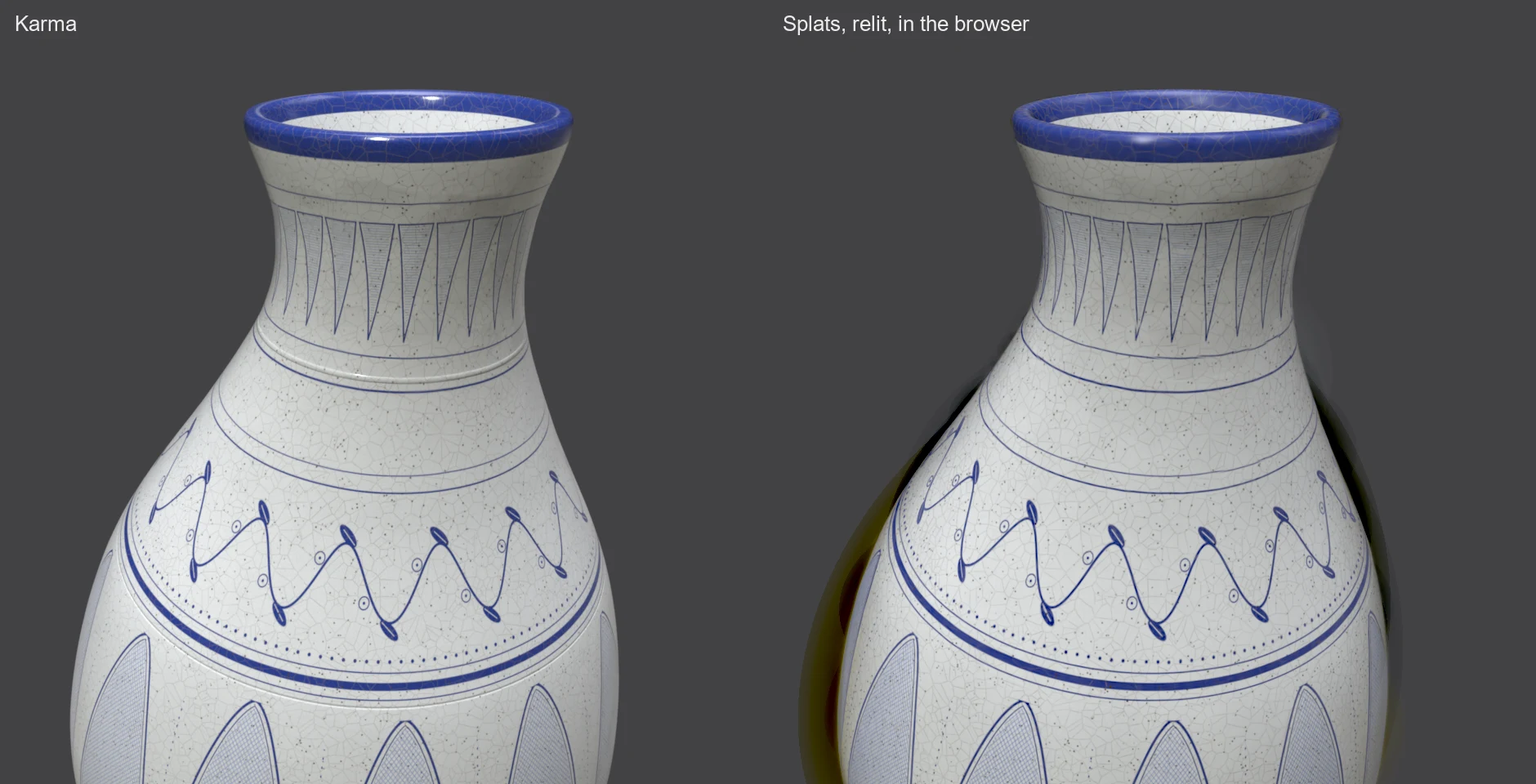
What if a hero object on a web page looked like a final Karma render, kept its fine detail up close, relit correctly under any light, and moved like a Houdini simulation, and you could grab it?
That was the brief we set ourselves. Over the last weeks we built it: a pipeline that takes an asset and its simulation from Houdini 22 and turns it into a compact package that runs live in the browser on WebGPU. This post covers how it works, what we measured, what surprised us, and what it is good for.
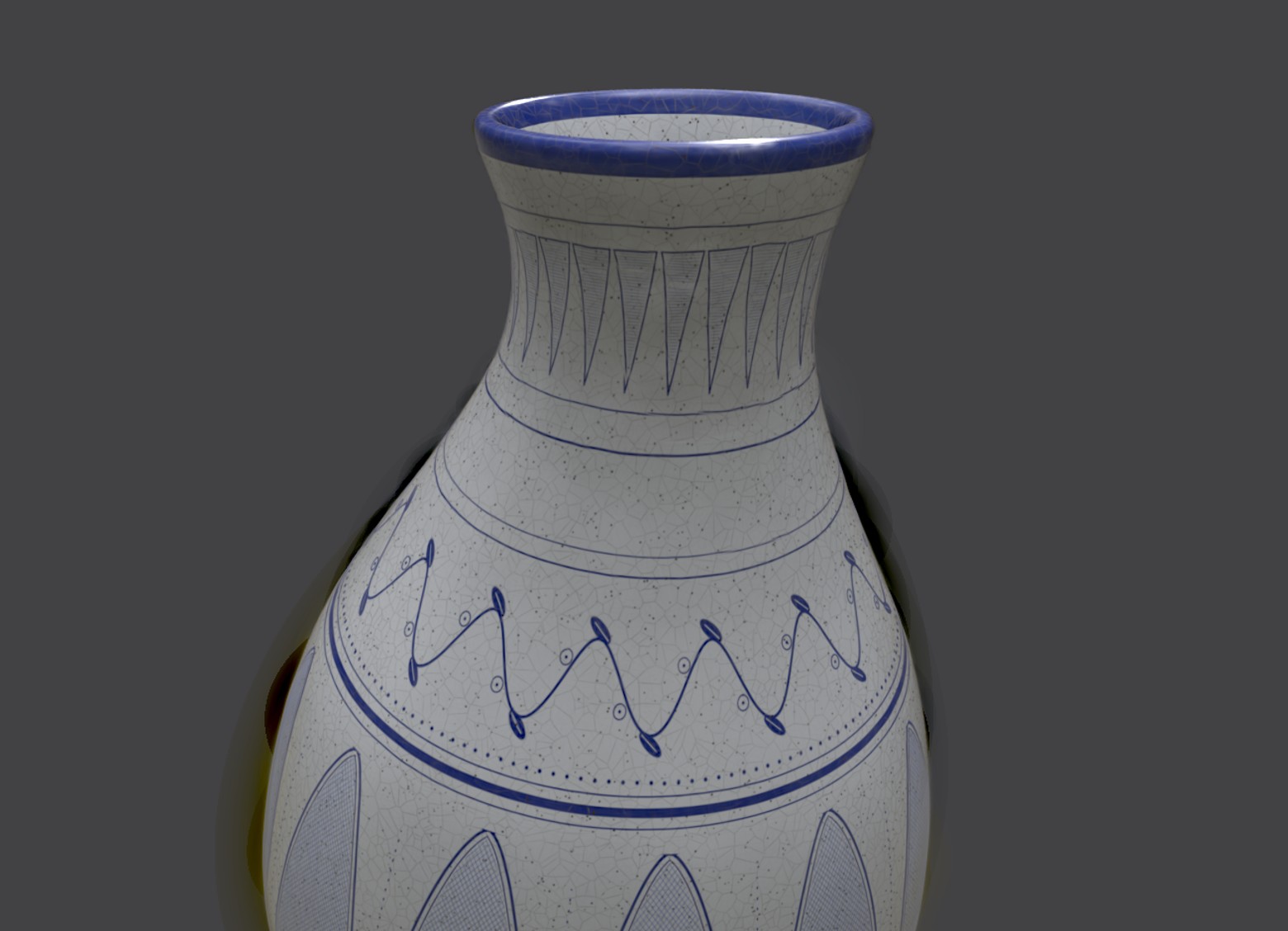
Our test subject is a ceramic vase, 30 cm wide and 50 cm tall, with a glossy glaze, thin painted lines and fine speckle. By the end, a visitor can drop it and watch it shatter as they scroll, or grab its rim and pull it, and it bends and wobbles back like a soft body, lit correctly the whole time.
The vase at a glance
- What: a hero object made of about 300,000 Gaussian splats, trained from Karma renders and driven by Houdini simulations
- Look: Houdini 22, MaterialX and Karma XPU, rendered from 160 cameras
- On the page: three.js with WebGPU and our own WGSL shaders
- Moves: an RBD shatter played by scroll, a Vellum soft body played by scroll, and a soft body the visitor can grab and drag
- Light: relit live from the asset's own material, under any HDRI and key light
- Size: 10.6 MB relit, 12.0 MB with baked colour, about 1.5 to 2 ms per frame at 1080p on desktop
- Measured: every claim against Karma, from the same cameras under the same lights
The rule we held ourselves to
Every claim in this post is measured against Karma. Karma is our ground truth: renders of the real source mesh, from the same cameras, under the same lights. "Looks good" was never the bar. The numbers below are PSNR (higher is better; 25 dB and up looks close to the reference, 30 dB and up is hard to tell apart) and silhouette error in pixels, plus timing on an RTX 4080 at 1080p.
That rule paid for itself many times. More on that at the end.
Step 1: splats from Karma
We render the vase from 160 cameras with Karma XPU using SideFX's "ML Train GSplats from Karma" recipe, and train 3D Gaussian splats on those frames with its trainer. The result is a cloud of about 300,000 small, coloured, semi-transparent ellipsoids that, blended together, reproduce the renders.
Our own WebGPU renderer, built on three.js with custom WGSL, draws them. Before anything else we made it draw exactly what the trainer draws: it matches the trainer's own renderer at 78.9 dB on the same model. From then on, every error we measured belonged to the splats, not to our renderer.
The first model scores 35.4 dB against Karma over the frame, takes 1.9 ms per frame at 1080p and downloads at 14.9 MB.
Step 2: detail
A hero object has to hold up when the camera gets close. Our vase has painted lines a fraction of a millimetre wide. Trained on 2048 px frames, 300k splats keep 73 to 85% of Karma's finest detail energy, with that detail in the right place. Fine relief, such as the glint along the cobalt lip, needs more than one normal per splat, so a per-pixel detail mode shades the specular highlight from the asset's own normal and roughness maps.
Step 3: relighting
Plain splats bake the lighting in: they look right under the light they were trained with and nowhere else. A hero object on a website has to sit in whatever lighting the page has. So each splat also carries its material (albedo, roughness, a normal from the source mesh, ambient occlusion and a small baked visibility function), and the renderer shades it like the asset's MaterialX Standard Surface under an HDRI and a key light.
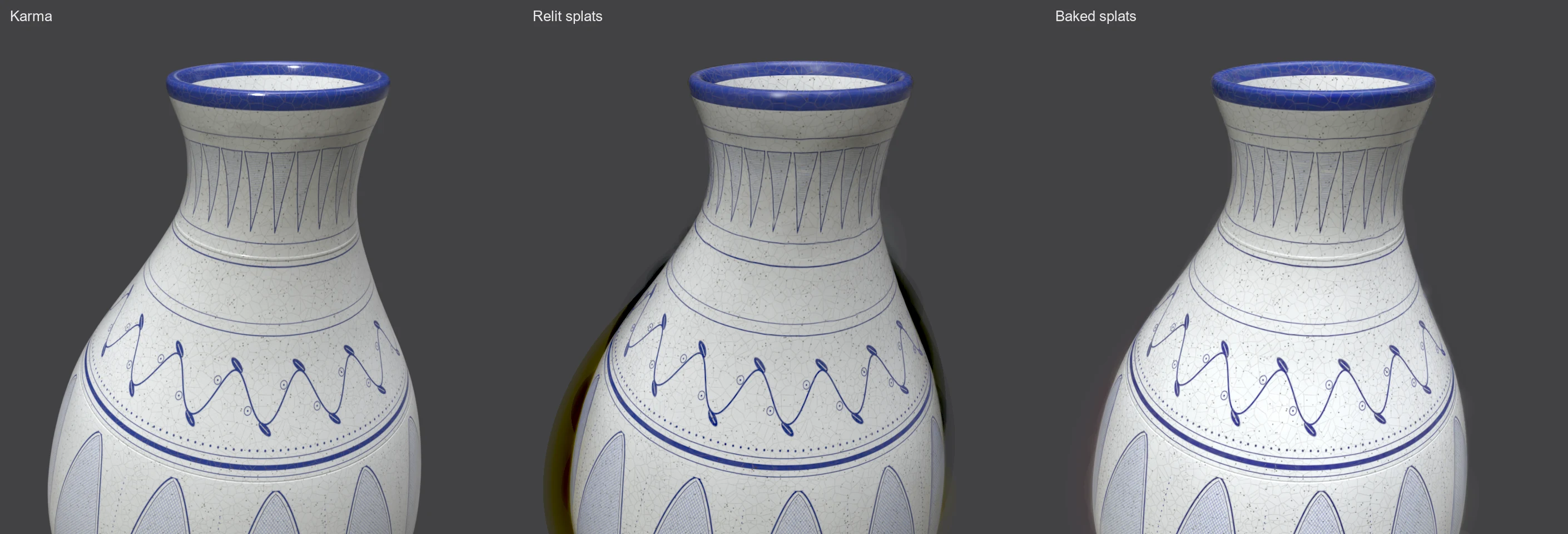
Under two lighting setups the model never saw, the relit splats score 26.9 and 28.4 dB against Karma. The baked-colour model scores 15.1 and 21.4 dB on the same views.
Step 4: shattering it
The vase drops 75 cm and breaks into 50 pieces in a Houdini rigid-body sim. Scrolling the page plays the shatter, forwards and backwards.
The textbook approach needs a custom trainer that keeps every splat inside its own piece. We avoided it: we trained the stock recipe once on an exploded layout, every piece pulled apart, so the fracture faces get trained and no splat can bridge two pieces. Each splat then belongs to the piece that contains it, and the browser moves it with its piece.
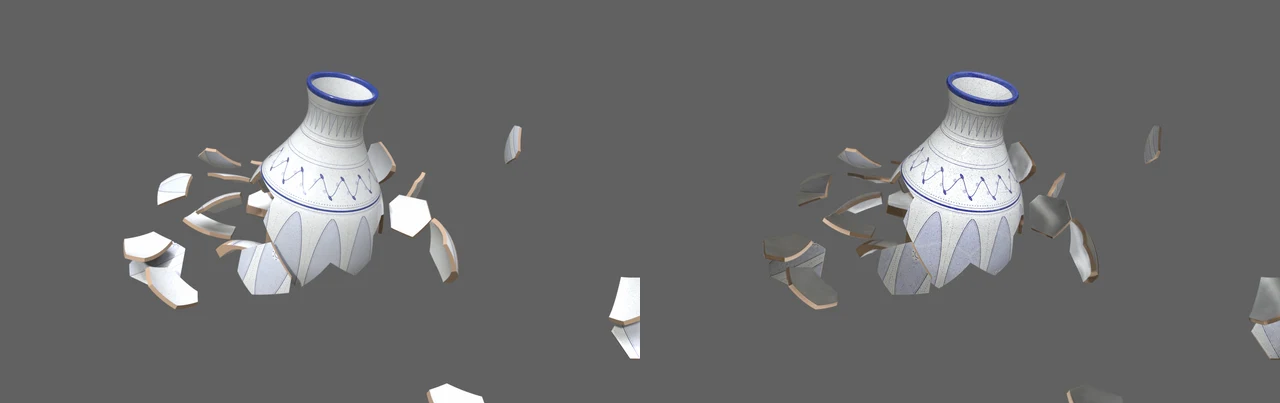
The geometry holds: no seams, no hollow pieces, silhouettes within 0.7 to 0.8 px of Karma, at 12.0 MB and 0.7 ms per frame. Baked lighting does not survive the tumble, though. Once pieces land in new orientations, each keeps the light it was trained with: a shard that lands face up should catch the light, but a baked one stays grey. Before the impact the splats score 26.3 to 26.8 dB; once broken, 13.9 to 17.3 dB. That is exactly what relighting is for.
Step 5: bending it
Next the vase became a Vellum soft body. In the sim, a hand grabs the rim, pulls it 12 cm sideways and lets go, and the vase wobbles back to rest.
We did not retrain anything. The splats trained at rest are deformed in two layers:
- coarse: 256 rigid controls fitted to the sim, with smooth skinning weights;
- fine: a compressed correction living on the sim's own surface mesh, predicted from the coarse state by a small neural network.
Each splat's shape follows the exact local deformation (we compared three ways of doing that and kept the most accurate one; they cost the same). Splats land within 0.05 mm of where the simulation puts them at the median, and the whole deformation costs 0.08 ms on the GPU per frame.
Step 6: relighting in motion
A bending object changes how it catches the light. So each splat's normal turns with the deformation, and its baked visibility is read in its own turned frame.
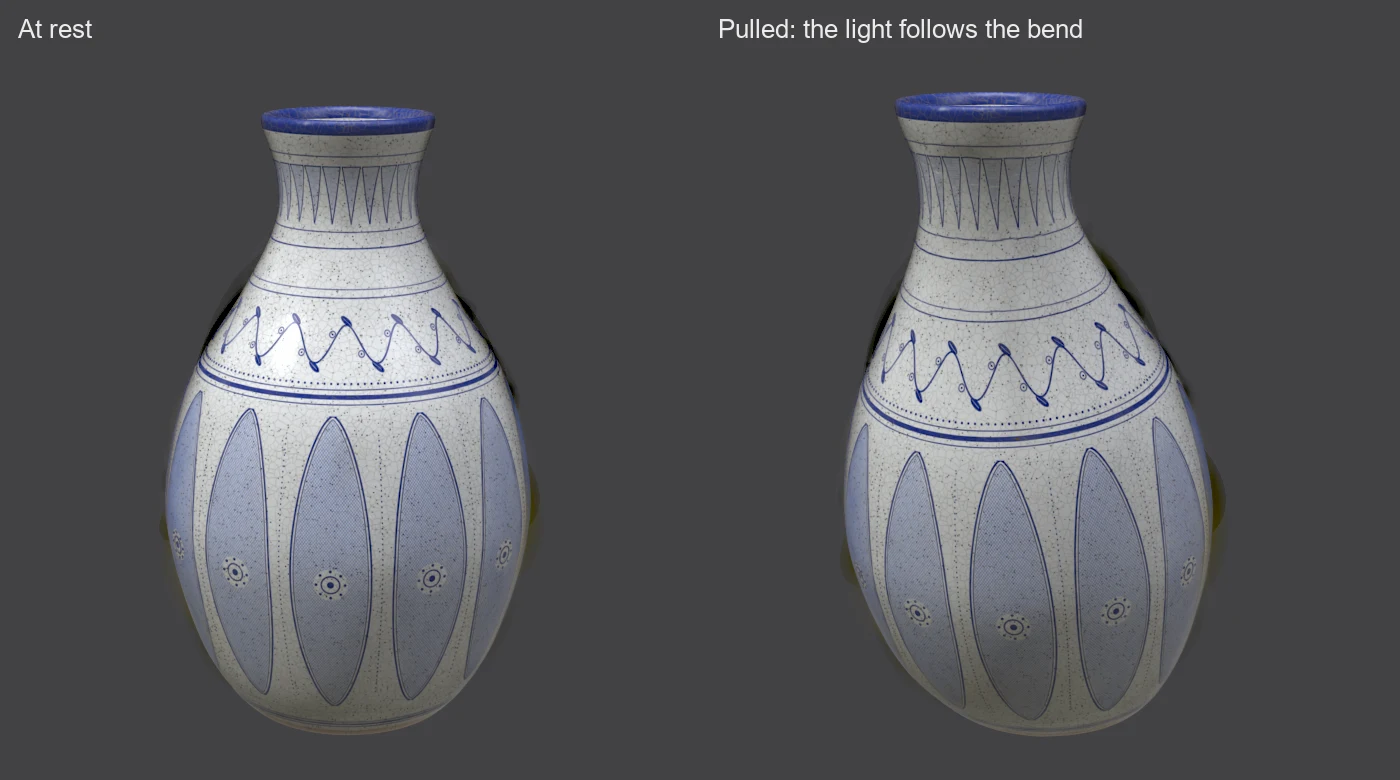
This is where relighting earns its keep. Against Karma under three different lightings, the relit bending vase scores 24.8 to 25.4 dB at every frame we measured, at rest and at the full bend alike. The same splats with baked lighting score 27.7 dB at rest but fall to 19.5 dB at the full bend, because baked light cannot follow a bend.
Step 7: grabbing it
Scroll-driven playback is fun, but we wanted the visitor to touch it. For that we ran 150 Vellum sims of the rim dragged along random cursor paths and released, and trained a small controller network, in the style of Holden et al.'s learned simulations, to step the soft body forward from the cursor 30 times a second. In the browser, the grabbed rim stays exactly on the cursor, and the rest of the vase follows as the simulation would.
On new sims it never saw, the vase stays within 0.3 to 1.2 mm of the Vellum sim on average over 5 seconds, and within 2.9 mm over a 60-second session of eight grabs. It never drifts out of the range it was trained on, and after every release it settles back to rest. The networks run on the CPU, beside the GPU's rendering.
Step 8: no popping, and a surprise
Splats are sorted back to front every frame. As the camera moves, overlapping splats can swap order and pop. We built a compute rasterizer that sorts per screen tile and then fixes the order per pixel along each splat's own ray depth, the idea behind recent pop-free splatting research.
Then we measured it along a 120-frame camera path against Karma, and on this asset it did not pay off. The plain global sort was the most stable of the three paths we tried and the most accurate, at half the cost. With 300,000 small, dense splats, a swap rarely shows. The plain path stays the default; the pop-free path stays in our engine for heroes with large overlapping splats, like smoke or foliage. Measuring saved us from shipping a slower renderer for nothing.
Size and phones
With 8-bit encodings for the parts that tolerate them, the bending vase downloads at 12.0 MB with baked colour, or 10.6 MB relit, within our 15 MB budget for a hero object. On desktop, a full frame takes about 1.5 to 2 ms on the GPU at 1080p.
For phones, a dedicated profile halves the sorting work with 16-bit depth keys, clamps each splat's on-screen footprint and renders at a lower internal resolution, and we have tested it on phones as well.
What went wrong, and what we learned
Suspect the measurement first. Four of our worst-looking results were measurement bugs, not rendering bugs:
- a file converter applying a gamma curve to some Karma frames;
- a USD camera layer at the wrong frame rate, so Karma showed a different moment of the sim than the browser;
- Houdini's Point Deform at its default settings smoothing the simulation by up to a millimetre in our ground truth;
- an object-space normal map: Karma shaded the bent and broken vase with its rest-pose normals. That made correctly relit splats look worse than baked ones, until we turned the map with the surface.
Each would have sent us chasing the wrong problem. Rendering the ground truth honestly turned out to be as hard as rendering the splats.
Use the tools as they are where you can. Training once on an exploded layout saved a custom trainer. Reusing the rest-trained splats for the soft body saved a whole training run.
Keep per-splat work simple. Every expensive, nonlinear step runs on small data: 256 controls, a cage of a few thousand points, a couple of tiny networks. The work per splat stays a handful of multiply-adds, which is what makes 300,000 of them fast enough for a web page.
What it is for
- Scroll-driven product and brand pages: the bottle that shatters, the sneaker that squashes, at Houdini quality and sharp at any screen size.
- Interactive product viewers that look like your renders, relight to match the page, and can be squeezed or poked when the product is soft.
- Interactive campaigns and ads where people grab, break or bend the product.
- Client previews: a simulated asset reviewed live in a browser, relit, with no Houdini or render farm on the client's side.
Each new object takes about a day of unattended compute on one workstation: Karma renders, training, and the simulations if it moves.
If you would like a hero object like this for your project, get in touch with Caowl Studios.